








Provide Modules in Odoo
Place all the provided API Framework modules folders into the Odoo addons directory.
Confirm below modules
- ekika_utils
- api_framework_base
- api_log
- api_auth_apikey
- api_auth_apiuser
- api_auth_basic
- api_auth_oauth2
- api_auth_jwt
- api_auth_public
- api_resource_access
- easy_graphql
- easy_jsonapi
- api_cors_config
- easy_jsonapi_apikey_signup
- easy_jsonapi_basic_signup
- easy_restjson
- jsonapi_studio
- restjson_studio
- graphql_studio
- easy_jsonapi_jwt_signup
- easy_restjson_apikey_signup
- ekika_widgets
Install Python Packages for API in Odoo
Please select the Odoo version below to view the required Python package dependencies for the Odoo API framework.
Version 19 – Python Dependencies
Install the following Python packages for Version 19:
graphql-core==3.2.3
graphene==3.4.3
PyJWT==2.3.0
requests-oauthlib==1.3.1
pip install graphql-core==3.2.3 graphene==3.4.3 PyJWT==2.3.0 requests-oauthlib==1.3.1Version 18 – Python Dependencies
Install the following Python packages for Version 18:
graphql-core==3.2.3
graphene==3.4.3
PyJWT==2.3.0
requests-oauthlib==1.3.1
pip install graphql-core==3.2.3 graphene==3.4.3 PyJWT==2.3.0 requests-oauthlib==1.3.1Version 17 – Python Dependencies
Install the following Python packages for Version 17:
graphql-core==3.2.3
graphene==3.4.3
PyJWT==2.3.0
requests-oauthlib==1.3.1
pip install graphql-core==3.2.3 graphene==3.4.3 PyJWT==2.3.0 requests-oauthlib==1.3.1Version 16 – Python Dependencies
Install the following Python packages for Version 16:
graphql-core==3.2.3
graphene==3.4.3
PyJWT==2.3.0
requests-oauthlib==1.3.1
pip install graphql-core==3.2.3 graphene==3.4.3 PyJWT==2.3.0 requests-oauthlib==1.3.1Version 15 – Python Dependencies
Install the following Python packages for Version 15:
graphql-core==3.2.3
graphene==3.4.3
PyJWT==2.3.0
requests-oauthlib==1.3.1
pip install graphql-core==3.2.3 graphene==3.4.3 PyJWT==2.3.0 requests-oauthlib==1.3.1Version 14 – Python Dependencies
Install the following Python packages for Version 14:
graphql-core==3.1.5
graphql-relay==3.0.0
graphene==3.0
PyJWT==2.3.0
requests-oauthlib==1.3.1
cryptography==2.6.1
 (if cryptography not installed)
pip install graphql-core==3.1.5 graphql-relay==3.0.0 graphene==3.0 PyJWT==2.3.0 requests-oauthlib==1.3.1Version 13 – Python Dependencies
graphql-core==3.1.5
graphql-relay==3.0.0
graphene==3.0
PyJWT==2.3.0
requests-oauthlib==1.3.1
cryptography==2.6.1
 (if cryptography not installed)
pip install graphql-core==3.1.5 graphql-relay==3.0.0 graphene==3.0 PyJWT==2.3.0 requests-oauthlib==1.3.1Version 12 – Python Dependencies
Install the following Python packages for Version 12:
graphql-core==3.1.5
graphql-relay==3.0.0
graphene==3.0
PyJWT==2.3.0
requests-oauthlib==1.3.1
cryptography==2.6.1
 (if cryptography not installed)
pip install graphql-core==3.1.5 graphql-relay==3.0.0 graphene==3.0 PyJWT==2.3.0 requests-oauthlib==1.3.1Version 19 – Python Dependencies
Install the following Python packages for Version 19:
graphql-core==3.2.3
graphene==3.4.3
PyJWT==2.3.0
requests-oauthlib==1.3.1
pip install graphql-core==3.2.3 graphene==3.4.3 PyJWT==2.3.0 requests-oauthlib==1.3.1Version 18 – Python Dependencies
Install the following Python packages for Version 18:
graphql-core==3.2.3
graphene==3.4.3
PyJWT==2.3.0
requests-oauthlib==1.3.1
pip install graphql-core==3.2.3 graphene==3.4.3 PyJWT==2.3.0 requests-oauthlib==1.3.1Version 17 – Python Dependencies
Install the following Python packages for Version 17:
graphql-core==3.2.3
graphene==3.4.3
PyJWT==2.3.0
requests-oauthlib==1.3.1
pip install graphql-core==3.2.3 graphene==3.4.3 PyJWT==2.3.0 requests-oauthlib==1.3.1Version 16 – Python Dependencies
Install the following Python packages for Version 16:
graphql-core==3.2.3
graphene==3.4.3
PyJWT==2.3.0
requests-oauthlib==1.3.1
pip install graphql-core==3.2.3 graphene==3.4.3 PyJWT==2.3.0 requests-oauthlib==1.3.1Version 15 – Python Dependencies
Install the following Python packages for Version 15:
graphql-core==3.2.3
graphene==3.4.3
PyJWT==2.3.0
requests-oauthlib==1.3.1
pip install graphql-core==3.2.3 graphene==3.4.3 PyJWT==2.3.0 requests-oauthlib==1.3.1Version 14 – Python Dependencies
Install the following Python packages for Version 14:
graphql-core==3.1.5
graphql-relay==3.0.0
graphene==3.0
PyJWT==2.3.0
requests-oauthlib==1.3.1
cryptography==2.6.1
 (if cryptography not installed)
pip install graphql-core==3.1.5 graphql-relay==3.0.0 graphene==3.0 PyJWT==2.3.0 requests-oauthlib==1.3.1Version 13 – Python Dependencies
graphql-core==3.1.5
graphql-relay==3.0.0
graphene==3.0
PyJWT==2.3.0
requests-oauthlib==1.3.1
cryptography==2.6.1
 (if cryptography not installed)
pip install graphql-core==3.1.5 graphql-relay==3.0.0 graphene==3.0 PyJWT==2.3.0 requests-oauthlib==1.3.1Version 12 – Python Dependencies
Install the following Python packages for Version 12:
graphql-core==3.1.5
graphql-relay==3.0.0
graphene==3.0
PyJWT==2.3.0
requests-oauthlib==1.3.1
cryptography==2.6.1
 (if cryptography not installed)
pip install graphql-core==3.1.5 graphql-relay==3.0.0 graphene==3.0 PyJWT==2.3.0 requests-oauthlib==1.3.1Restart Server & Update App List
Restart your odoo server. Once server restarted please follow below steps to update app list
- Activate Odoo developer mode by appending the query parameter ?debug=1 to the URL.
- Go to App --> Update Apps List --> Update.

Install Odoo API Framework Module
After update app list, Search for the module named “api_framework” and activate it.
User Permission
Once the module is installed, assign the required user permissions:
Go to Settings --> Users
Open the desired user form
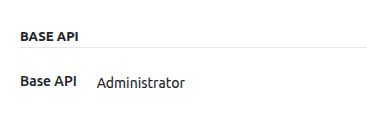
Set Base API --> Administrator
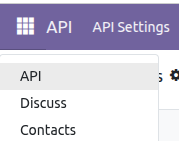
After this, the API menu will be visible to the user.